
How it works
A plain-English tour of what happens under the hood. You don't need this to use aiDimag, but it helps to know where things live and why.
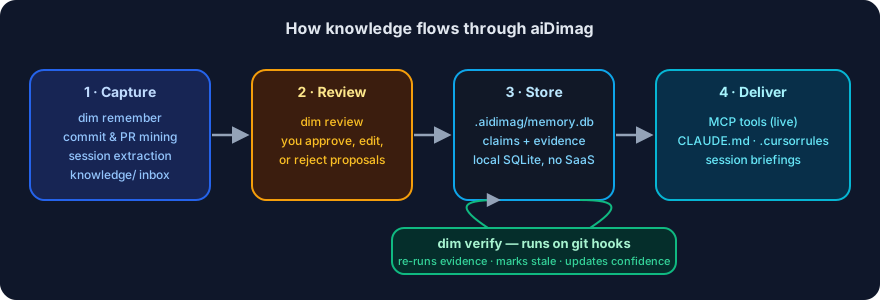
The store: one SQLite file per repo
All memory lives in .aidimag/memory.db, a local SQLite database next to your code. There's no server to run for single-developer use, and no account needed.
- Searching uses SQLite's full-text search (FTS5) plus, optionally, vector similarity (semantic search) when an embedding provider is available.
- The database file is gitignored by default so your local memory doesn't get committed. The small
config.json(no secrets) is meant to be committed so teammates inherit settings.
Capture: how knowledge gets in
There are three ways memory is captured — and two of them go through human review first:
- You, directly —
dim remember "..."writes a memory immediately. You're the author, so there's nothing to second-guess. - The commit miner — after each
git commit, aiDimag scans the commit for memory-worthy signals (decisions, gotchas, failed approaches) and proposes candidates. Nothing is saved automatically; you get a one-line nudge to review. - Session-end extraction — an AI agent, at the end of a session, calls a tool to propose durable learnings. Again, proposals, not memories.
There's also a fourth, deliberate channel — the knowledge inbox: drop project docs into knowledge/ and aiDimag summarizes them into proposals (which, once approved, become pinned memories). See Knowledgebase.
Proposals wait in a queue until you run dim review.
Verification: how memory stays honest
This is the heart of aidimag. Memories are claims with evidence, and dim verify re-runs that evidence against the current code:
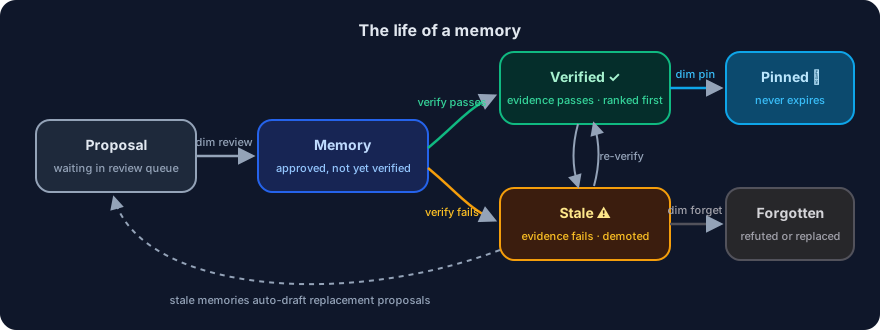
- All checks pass → the memory becomes (or stays) verified, confidence ticks up.
- Any check fails → the memory goes stale, confidence is floored.
- Nothing to check → time decay slowly lowers confidence until the memory is demoted.
Verification runs automatically via git hooks that dim init installs (additively — it never clobbers existing hooks):
| Hook | What it does |
|---|---|
post-merge, post-checkout, post-rewrite | Re-run cheap verification after pulls, branch switches, rebases |
post-merge | Also summarize freshly-pulled knowledge-inbox docs (dim knowledge sync, best-effort) |
post-commit | Mine the new commit for memory candidates |
pre-push | Enforce the branch-naming convention (if configured) |
pre-commit | Optional contradiction check (dim check) — off unless you enable it |
Expensive checks (running tests) only happen when you ask: dim verify --deep, ideally on a schedule or in CI.
Retrieval: how the right memory surfaces
When you (or an agent) search, aiDimag uses hybrid retrieval:
- keyword match (FTS5) +
- semantic match (vector similarity, if embeddings are set up), then
- trust-ranking: verified memories outrank unverified, which outrank stale.
So even if a stale memory matches your query, it's pushed down and clearly labeled.
Delivery: how AI tools receive memory
Two channels, so every tool benefits:
- MCP server (
dim mcp) — agents that speak the Model Context Protocol (Claude Code, Cursor, Copilot) call tools likememory_searchandmemory_critiquelive. - Generated context files —
dim generate-contextwritesCLAUDE.md,.cursorrules, and.github/copilot-instructions.mdfrom your trusted memory, for tools that just read a file at startup. With--auto, these regenerate whenever memory changes.
Team mode: an optional shared brain
For a team, run a small self-hosted sync server (dim serve). Each member links their repo (dim cloud link) and runs dim sync:
- It's last-writer-wins by modification time, with tombstones so deletions propagate.
- The server is a dumb ordered log — all the smart merging, verification, and ranking stay on each client.
- An append-only event log ships verification results so the server can report cross-machine consensus: "3 machines confirm this memory passes at commit X."
No SaaS is required; the same protocol is what a future hosted version would use.
Putting it together
        you / agent
            │  remember / propose
            ▼
   ┌──────────────────┐      verify (hooks + dim verify)
   │  .aidimag/        │◀──────────────────────────────┐
   │   memory.db       │   re-run evidence, decay,      │
   └──────────────────┘   mark stale / verified         │
            │                                            │
   search (hybrid + trust-rank)                          │
            │                                            │
   ┌────────┴─────────┐                                  │
   ▼                  ▼                                  │
 MCP server     generated CLAUDE.md  ───────────────────┘
 (live tools)   (.cursorrules, copilot)
Next: Getting started.