
Team sync
By default aiDimag is single-player: memory lives in a local SQLite file. To share a team brain for a repo, use aiDimag Cloud (hosted) or run your own sync server.
Cloud sync one-pager
For the hosted dashboard + API key flow, see Cloud sync TLDR. This page covers the self-hosted dim serve option.
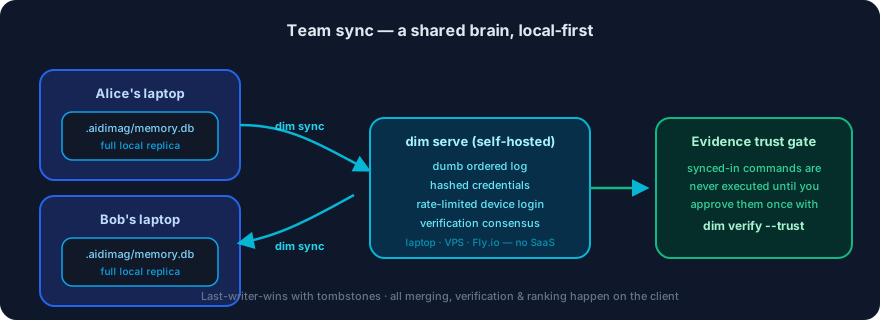
The model
- Local-first. Everyone still reads/writes their own local replica; nothing blocks on the network.
dim syncexchanges changes — last-writer-wins by modification time, with tombstones so deletions propagate.- The server is a dumb ordered log. All the smart merging, verification, and ranking stay on each client. The future hosted version uses this same protocol.
Set up a server
Quick start (local testing)
Run it anywhere reachable — a laptop, a VPS, Fly.io:
dim serve --token <shared-secret> --db ./team-sync.db --port 8787Remote deployment
Deploy the sync server using Docker on any host (Railway, Render, VPS, Fly.io, etc.).
npm run build
docker build -f deploy/Dockerfile -t aidimag-sync .
docker run -d -p 8787:8787 -v aidimag_data:/data \
  -e AIDIMAG_SYNC_TOKEN=<admin-token> aidimag-sync
Important: Put HTTPS in front (Caddy/Traefik/cloud load balancer) before real use — tokens travel as Bearer headers.
Deployment files
The deploy/ directory contains:
Dockerfile— Container image for the sync serverfly.toml— Fly.io configurationREADME.md— Detailed deployment instructions
Security note
The AIDIMAG_SYNC_TOKEN is your admin token. Store it securely (password manager, secrets vault). Never commit it to the repository. Use this token to mint brain-scoped keys for team members (see API keys section below).
Link a repo
Each team member, inside the repo:
dim cloud link --server http://your-server:8787 --brain myrepo --token <shared-secret>
dim sync
The server URL and brain name go in .aidimag/config.json (safe to commit). The token goes in ~/.aidimag/credentials.json — never in the repo. So onboarding a teammate is:
dim init
dim cloud link --token <secret>
dim sync
Automatic sync
Sync also runs automatically (debounced, ~30s) after remember, review, verify, refute, and forget. Disable it with AIDIMAG_AUTO_SYNC=off.
Device login instead of pasting tokens
dim loginShows a short code, opens the server's approval page, and an existing credential approves the device. The minted token inherits that approver's brain scope and is revocable. dim logout clears it.
API keys (don't share the admin token)
The --token you start the server with is the admin token. Mint revocable, brain-scoped member keys instead of sharing it:
AIDIMAG_ADMIN_TOKEN=... dim keys create --brain myrepo --label alice
# → aidimag_sk_...  (only valid for that brain)

dim keys list --brain myrepo
dim keys revoke --key aidimag_sk_...
Cross-machine consensus
Every memory-lifecycle change (create / status / evidence / verification) is recorded in a local append-only event log and shipped on sync. The server aggregates verification reports across machines, so you can answer: "How many machines confirm this memory passes at commit X?" — turning one developer's green check into team-wide confidence.
Security
- Evidence trust gate — synced-in memories can carry executable evidence (shell commands). Those are never executed on your machine until you inspect and approve them once with
dim verify --trust; until then verification simply skips them. Evidence you wrote or approved locally is trusted automatically. See Verifying memories. - Credentials are hashed at rest — the server stores only SHA-256 hashes of API keys and account tokens (existing plaintext rows are migrated automatically).
dim keys listshows fingerprints, not secrets. - Rate limiting — the unauthenticated device-login endpoints are limited per IP, so short user codes can't be brute-forced.
- Generic errors — the server never leaks internal error details to clients; specifics go to the server log only.
Check status
dim cloud statusNext: Knowledgebase.